Load Balancing: Distributing Traffic Across Servers
Series: System Design · Scalability & Infrastructure — Pillar 6 of 8
Systems Design
| # | Post | What it covers |
|---|---|---|
| 00 | Scalability & Infrastructure: The Layer Between Your Code and the Internet | Nine concepts covering load balancing, rate limiting, proxies, compression, and probabilistic data structures that keep large systems fast and reliable. |
| 01 | Client-Server Architecture: The Model Everything Else Builds On | Client-server is the foundational model for distributed systems. Learn what clients and servers know, where state lives, and how the model scales. |
| 02 | Load Balancing: Distributing Traffic Across Servers ← you are here | Load balancers distribute traffic across servers for scale and availability. Learn how they work, what types exist, and what they require of backend servers. |
| 03 | Load Balancing Algorithms: How Traffic Is Distributed | Round robin, least connections, IP hash, weighted — each algorithm makes different tradeoffs. Learn how to choose the right one for your workload. |
| 04 | Rate Limiting: Protecting Services from Overload | Rate limiting protects services from overload and abuse. Learn how token bucket, leaky bucket, and sliding window algorithms work and when to use each. |
| 05 | Proxy vs Reverse Proxy: Which Way Does It Face? | Forward proxies protect clients; reverse proxies protect servers. Learn how each works, what Nginx and Cloudflare do, and when you need which. |
| 06 | Data Compression: Smaller, Faster, Cheaper | Compression reduces bandwidth and storage costs. Learn how Gzip, Brotli, LZ4, and zstd work, where to apply them, and the CPU tradeoffs involved. |
| 07 | Checksums: Detecting Corruption Before It Becomes a Catastrophe | Checksums detect silent data corruption in transit and storage. Learn how CRC32, MD5, and SHA-256 work and where to apply them in distributed systems. |
| 08 | Bloom Filters: Answering "Have I Seen This?" Without Storing Everything | A Bloom filter answers "have I seen this?" in constant memory. Learn how they work, why false positives are acceptable, and where they're used in production. |
| 09 | HyperLogLog: Counting Distinct Items Without Storing Them | HyperLogLog counts distinct values in ~1.5 KB of memory with <2% error. Learn how it works and why Redis, BigQuery, and Postgres use it. |
| 10 | Scalability & Infrastructure: Wrap-Up | A recap of all 9 scalability concepts: load balancing, rate limiting, proxies, compression, checksums, Bloom filters, and HyperLogLog. How they fit together. |
Load Balancing: Distributing Traffic Across Servers
The problem
Your URL shortener is running on one application server. It handles two thousand requests per second comfortably. Traffic grows. Three thousand requests per second — latency starts climbing. Four thousand — errors appear. Five thousand — the server is saturated and requests time out.
The obvious fix: get a bigger server. But you're already on one of the largest instance types available. Vertical scaling has a ceiling.
The horizontal alternative: run two servers, each handling half the traffic. Then four. Then twenty. Any number you need.
But there's a problem: your users point their browsers at sho.rt — a single hostname. DNS resolves to a single IP. A second server, even running the same code, is invisible to users unless something in the middle routes traffic to it.
That something is a load balancer.
The core idea
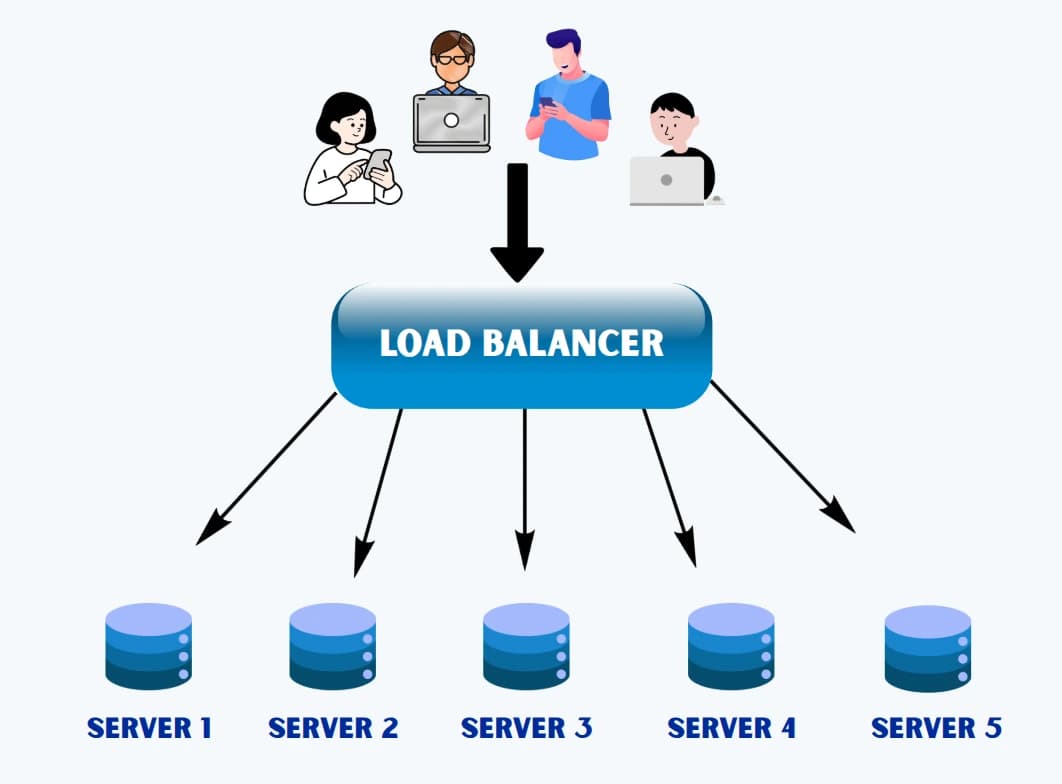
A load balancer sits between clients and a pool of backend servers. It receives all incoming requests, selects a backend server based on a distribution algorithm, and forwards each request to the selected server. To clients, the system looks like a single service at a single address. Behind the load balancer, any number of servers can share the work.
The analogy: a supermarket with multiple checkout lanes
A single cashier can only serve customers so fast. Add more cashiers — but customers still enter through one door. A lane manager at the entrance watches all lanes and directs each new customer to the least-busy one. No single cashier is overwhelmed while others are idle. Adding or removing cashiers is handled by the lane manager — customers don't know or care how many lanes are open.
The lane manager is the load balancer. The cashiers are the backend servers. The customers are client requests. The entrance is the single public-facing endpoint.
How load balancers work
The basic flow
Client 1 ─────┐
Client 2 ─────┤ → Load Balancer → Server A
Client 3 ─────┤                 → Server B
Client 4 ─────┘                 → Server C

Each client request:
1. TCP connection to load balancer's IP
2. Load balancer selects a backend server
3. Forwards the request to that server
4. Receives the response
5. Returns the response to the client
To clients, every request goes to the same address (sho.rt, 104.21.x.x). The load balancer is transparent.
Layer 4 vs Layer 7 load balancing
Load balancers operate at different layers of the network stack:
Layer 4 (Transport Layer) — TCP/UDP load balancing:
- Routes based on IP address and port
- Does not inspect request contents
- Faster (no packet parsing)
- Cannot route based on HTTP path, headers, or cookies
- Used when raw throughput and lowest latency matter
Layer 7 (Application Layer) — HTTP/HTTPS load balancing:
- Inspects full HTTP request: path, headers, cookies, body
- Can route by URL path (
/api/*→ API servers,/static/*→ static servers) - Can terminate TLS (decrypt HTTPS before forwarding to backend)
- Can add, strip, or modify headers
- Can perform health checks via HTTP (GET /health)
- Slightly higher latency (must parse HTTP)
- Used for most modern web applications
AWS ALB, Nginx, HAProxy (in HTTP mode), and Cloudflare Workers are Layer 7 load balancers. AWS NLB is Layer 4.
Health checks
A load balancer that routes traffic to a down server is useless — and potentially harmful. Load balancers continuously probe backend servers with health checks:
Every 10 seconds, per backend:
  Load Balancer → GET http://server-A/health

  Response 200 OK: server is healthy → keep in rotation
  Response 500 / timeout: server is unhealthy → remove from rotation

  After N consecutive healthy responses: return to rotation
Health checks are what make load balancing a resilience mechanism, not just a scaling one. When Server B crashes at 3am, the load balancer detects it within seconds (2–3 failed health check intervals) and stops routing to it. Server A and C absorb the traffic without the need for human intervention.
Session stickiness (sticky sessions)
Stateless servers (the ideal, per post 01) can handle any request regardless of which server handled previous requests from the same client. No stickiness needed.
Stateful servers — or servers that maintain in-memory state for a user session — require that a client always reaches the same server. This is sticky sessions: the load balancer routes all requests from the same client to the same backend.
Stickiness is typically implemented via:
- Cookie-based: the load balancer sets a cookie identifying the backend server. The client sends it on subsequent requests.
- IP hash: the client's IP is hashed to select a consistent server.
Sticky sessions are a design smell — they mean your servers are stateful and don't scale cleanly. If the sticky server fails, the client's session is lost. Prefer stateless servers with shared external state (Redis session store, database). If you must use sticky sessions, use them deliberately and document why.
SSL/TLS termination
HTTPS traffic is encrypted. Decrypting it requires the private key. Options:
TLS termination at the load balancer: the load balancer holds the TLS certificate and private key. It decrypts incoming HTTPS, communicates with backends over unencrypted HTTP (within the data centre's private network). Simpler — backends don't need TLS configuration. The private network between load balancer and backends is trusted.
TLS pass-through: the load balancer forwards encrypted traffic directly to the backend. The backend decrypts it. Requires each backend to hold the certificate. Used when end-to-end encryption is required even within the data centre.
TLS re-encryption: load balancer decrypts at Layer 7 (to inspect request content), then re-encrypts for the backend. Full inspection + end-to-end encryption. Higher CPU cost.
Most cloud load balancers (AWS ALB, GCP Load Balancer) do TLS termination — simpler, and private network traffic within a VPC is considered trusted.
Multiple load balancing tiers
Large systems often have multiple tiers:
Internet
  ↓
DNS (geo-routing) → directs to nearest data centre
  ↓
Edge / CDN layer (Cloudflare, Fastly) → caches static content, absorbs DDoS
  ↓
External load balancer (AWS ALB) → distributes to app server fleet
  ↓
Internal load balancer → distributes to microservices
  ↓
App servers → Redis / PostgreSQL
Each tier handles a different type of traffic distribution and failure.
Tradeoffs
The load balancer is now critical infrastructure. A single load balancer is a single point of failure. Production load balancers run in pairs (active-passive or active-active) — if one fails, the other takes over via a floating IP and keepalive protocol (VRRP/HSRP). Managed services (AWS ALB, GCP GLB) handle this automatically.
Stateless backends are required for clean horizontal scaling. Sticky sessions work around stateful backends but are fragile. If you want to add and remove servers freely, externalise all session state.
Health check tuning matters. Too-frequent health checks add load to backends. Too-infrequent checks leave a failed server in rotation longer. Too-aggressive failure thresholds remove servers on transient blips. A single failed health check causing immediate removal is usually too aggressive; three consecutive failures is a common threshold.
TLS termination centralises security. The load balancer holds the private key — it must be secured, and certificate rotation must be managed. Managed services handle this well; self-managed load balancers require operational discipline.
The one thing to remember
A load balancer makes a pool of backend servers look like a single service, distributing requests and providing health-based failover. The servers behind it must be stateless — any server can handle any request — or the load balancer must maintain stickiness, which trades resilience for state affinity. Health checks are what turn a traffic distributor into a resilience mechanism: without them, a load balancer is just a round-robin router that happily sends traffic into a black hole.
← Previous: Client-Server Architecture — the foundational model
→ Next: Load Balancing Algorithms — the load balancer selects a backend for every request; the algorithm it uses determines fairness, latency, stickiness, and how it responds to heterogeneous server pools.




