NAT Explained in 5 Minutes: The Internet's Address Translator
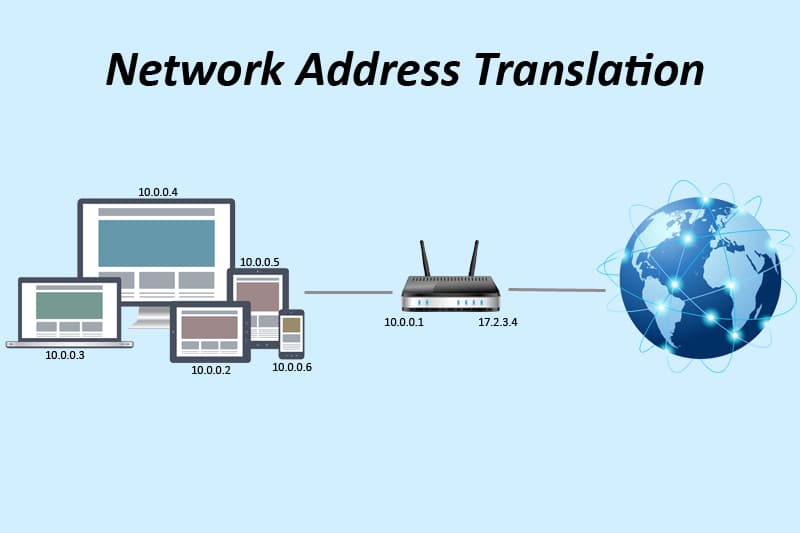
NAT Explained in 5 Minutes: The Internet's Address Translator
TL;DR
Network Address Translation (NAT) allows devices using private IP addresses to communicate with the public Internet by translating private addresses into public ones and keeping track of each connection.
The Problem
Imagine every laptop, phone, server, and IoT device needed its own unique public IP address.
The Internet simply doesn't have enough IPv4 addresses for that.
Instead, most networks use private IP addresses, which are not routable on the Internet.
For example, a typical home network might have:
Laptop:    192.168.1.10
Phone:     192.168.1.11
Smart TV:  192.168.1.12
These addresses work perfectly inside your home network — but Internet routers ignore them completely. As far as the wider Internet is concerned, they don't exist.
So how can three separate private devices all reach the public Internet — and how does a reply know which one of them to come back to?
That's where NAT comes in.
What NAT Does
NAT sits between a private network and the Internet.
When a device sends traffic:
It replaces the private source IP with a public IP.
It remembers the mapping.
When the response returns, it restores the original private address.
Private Network

Laptop: 192.168.1.10
     ↓
+----------------+
|      NAT       |
| Public IP      |
| 203.0.113.5    |
+----------------+
     ↓
Internet
To the Internet, every request from this network appears to come from the same address:
203.0.113.5
Internally, NAT knows exactly which private machine actually initiated each request — even when several of them are talking to the Internet at the same time.
A Simple Example
Suppose your laptop has:
Private IP:
192.168.1.10
You open a connection to a server out on the Internet. Your packet initially looks like this:
Source:
192.168.1.10:51000

Destination:
198.51.100.42:443
The NAT router changes it to:
Source:
203.0.113.5:61001

Destination:
198.51.100.42:443
When the reply arrives:
Destination:
203.0.113.5:61001
NAT checks its translation table:
61001
  ↓

192.168.1.10:51000
and forwards the packet back to your laptop.
The server never learns your laptop's private address — it only ever sees 203.0.113.5:61001.
That's straightforward enough with one device. The interesting part is what happens when your phone and your smart TV are doing the exact same thing, through the exact same public IP, at the exact same time.
👉 Try it yourself: the widget below shows all three devices — laptop, phone, and smart TV — sharing that one public address simultaneously, with NAT rewriting each connection and routing every reply back to the right device by port number.
The NAT Translation Table
Here's what the router's translation table looks like for the three devices you just watched above:
| Private Address | Public Address |
|---|---|
| 192.168.1.10:51000 | 203.0.113.5:61001 |
| 192.168.1.11:51500 | 203.0.113.5:61002 |
| 192.168.1.12:52000 | 203.0.113.5:61003 |
Same public IP every time. Different port per device. That one table is the entire trick — it's how hundreds or thousands of devices can share a single public IP without ever colliding.
Why Ports Matter
Notice something interesting:
The public IP is always the same.
Only the port number changes.
203.0.113.5:61001   (laptop)

203.0.113.5:61002   (phone)

203.0.113.5:61003   (smart TV)
This is called Port Address Translation (PAT).
PAT is the form of NAT used almost everywhere today.
Without ports, every internal machine would require its own public IP — and we'd be right back to the original problem.
Types of NAT
Static NAT
One private IP permanently maps to one public IP.
10.0.1.15
    ↓

203.0.113.15
Useful for servers that always need the same public address.
Dynamic NAT
A pool of public addresses is available.
Each private machine gets one temporarily.
Pool:

203.0.113.10
203.0.113.11
203.0.113.12
Less common today.
PAT (Most Common)
Many private machines share one public IP using different ports — exactly what you saw above:
Laptop, Phone, Smart TV

↓

203.0.113.5 (one shared IP, three different ports)
Almost every home router works this way.
NAT in AWS
AWS uses NAT frequently.
A common architecture looks like this:
Internet
    ↓
Internet Gateway
    ↓
NAT Gateway
    ↓
Private Subnet

EC2
ECS
EKS
RDS
Instances inside the private subnet can:
download software
call external APIs
access AWS services
But they cannot receive unsolicited inbound connections from the Internet.
This is a major security benefit.
Why NAT Improves Security
NAT is not a firewall, but it provides an important layer of protection.
Because external systems do not know about private addresses, they cannot initiate connections directly to internal machines.
Only connections that originated from inside are automatically allowed back — the same way NAT only forwarded that reply back to your laptop because your laptop was the one that opened the connection.
This greatly reduces the attack surface.
NAT Is Stateful
NAT remembers every active connection.
Example:
Laptop
   ↓

HTTPS request
   ↓

NAT creates entry
   ↓

Server replies
   ↓

NAT forwards response
Once the connection ends, the entry disappears.
Common Misconception
Many people think NAT and firewalls are the same thing.
They are not.
| NAT | Firewall |
|---|---|
| Translates addresses | Filters traffic |
| Keeps connection mappings | Enforces security rules |
| Makes private IPs Internet-accessible | Allows or blocks packets |
| Does not decide what is allowed | Controls what is permitted |
Most routers implement both.
Limitations of NAT
NAT isn't perfect.
Some downsides include:
Breaks true end-to-end connectivity.
Makes peer-to-peer applications more complex.
Complicates troubleshooting.
Can interfere with protocols that embed IP addresses inside payloads.
Requires techniques like NAT traversal for some real-time applications.
IPv6 and NAT
One of IPv6's goals was to eliminate the need for NAT.
IPv6 provides approximately:
340 undecillion addresses

340,282,366,920,938,463,463,374,607,431,768,211,456
That's enough for every device to have its own globally unique address — no translation table required, no shared IP, no port juggling.
Even so, NAT is still extremely common because most of today's Internet continues to rely heavily on IPv4.
Interview Questions
Why is NAT needed?
Because private IP addresses cannot be routed across the public Internet, NAT translates them into public addresses.
Why can thousands of devices share one public IP?
Because NAT uses different TCP/UDP port numbers to distinguish each connection.
Does NAT replace a firewall?
No.
NAT translates addresses.
Firewalls enforce security policies.
Why are AWS private subnets usually paired with a NAT Gateway?
So instances can initiate outbound Internet connections without being directly reachable from the Internet.
Key Takeaways
NAT translates private IP addresses into public IP addresses.
Most NAT implementations use Port Address Translation (PAT).
Thousands of devices can share a single public IP.
NAT hides internal addressing from the Internet.
NAT is stateful but is not a firewall.
AWS NAT Gateways provide outbound Internet access for private subnets.
IPv6 reduces the need for NAT but IPv4 NAT remains widely used.
What's Next?
In the next Quick Guides article, we'll explore CIDR notation—how IP address ranges are represented, why /24 and /16 matter, and how subnetting works in practice.