HTTP vs HTTPS: The Language of the Web and Its Secure Version
Series: System Design · Networking & Protocols — Pillar 2 of 8
HTTP vs HTTPS: The Language of the Web and Its Secure Version
Systems Design
| # | Post | What it covers |
|---|---|---|
| 00 | Networking & Protocols: How Bytes Actually Travel | Before you can design systems that scale, you need to understand how bytes actually travel. Eight concepts every backend engineer must know. (148 chars) |
| 01 | The OSI Model: The Map Every Engineer Needs | The OSI model isn't just interview theory — it's the map that tells you exactly where in the stack a network problem lives. Here's how to use it. (152 chars) |
| 02 | TCP vs UDP: Reliability vs Speed at the Transport Layer | TCP guarantees delivery. UDP doesn't look back. Understanding why each exists — and when to reach for each — is fundamental to network design. (150 chars) |
| 03 | HTTP vs HTTPS: The Language of the Web and Its Secure Version ← you are here | 301 Moved Permanently, 302 Found, 304 Not Modified |
| 04 | TLS/SSL: How HTTPS Actually Works Under the Hood | TLS is what puts the S in HTTPS. Here's how the handshake works, what a certificate actually contains, and why TLS 1.3 matters for performance. (152 chars) |
| 05 | DNS: The Phone Book That Runs the Internet | DNS is the phone book of the internet — and one of the most misunderstood layers in the stack. Here's how it works and how it fails. (133 chars) |
| 06 | DNS Load Balancing: Traffic Distribution at the Name Layer | DNS load balancing distributes traffic before a single packet reaches your servers. Here's how it works, where it excels, and where it falls short. (154 chars) |
| 07 | Anycast Routing: One Address, Everywhere at Once | One IP address, dozens of locations, zero client configuration. Anycast is how the fastest global infrastructure works — here's the mechanism behind it. (158 chars) |
| 08 | CDN: Moving Content Closer to the People Who Need It | A CDN isn't just a cache in front of your server. Here's how content delivery networks work, when they help, and when they add complexity for nothing. (154 chars) |
| 09 | Networking & Protocols: Wrap-Up | A complete recap of the eight core networking concepts — OSI, TCP, HTTP, TLS, DNS, CDN — and how they connect into a complete picture. (135 chars) |
Safe means the request has no side effects — a GET should never modify state. Idempotent means making the same request multiple times has the same effect as making it once — a DELETE of an already-deleted resource should return success (or 404), not create an error state.
These semantics matter in practice: a browser will automatically retry a GET on network failure but not a POST. A CDN will cache GET responses but not POST. A load balancer can route GET requests to any replica but may need to route POST requests to a primary.
HTTP response structure
HTTP/1.1 301 Moved Permanently          ← Status line: version, code, reason
Location: https://example.com/long-url  ←
Content-Length: 0                       ← Headers: metadata about the response
Cache-Control: max-age=3600             ←
                                        ← Blank line
                                        ← Body: empty for this redirect
Status codes
Status codes communicate the outcome of a request in a standardised way that every HTTP client understands:
| Range | Category | Common examples |
|---|---|---|
| 2xx | Success | 200 OK, 201 Created, 204 No Content |
| 3xx | Redirection | 301 Moved Permanently, 302 Found, 304 Not Modified |
| 4xx | Client error | 400 Bad Request, 401 Unauthorised, 403 Forbidden, 404 Not Found, 429 Too Many Requests |
| 5xx | Server error | 500 Internal Server Error, 502 Bad Gateway, 503 Service Unavailable, 504 Gateway Timeout |
The distinction between 4xx and 5xx matters operationally: 4xx errors are the client's fault — the request was malformed, unauthorised, or asked for something that doesn't exist. 5xx errors are your system's fault. Alerting on 5xx rates is standard practice; alerting on 4xx rates is noisier and requires more careful filtering.
In the URL shortener: a valid short code returns 301 Moved Permanently (the redirect target never changes) or 302 Found (if you want analytics to track each visit without browsers caching the redirect permanently). An unknown short code returns 404 Not Found. A malformed request returns 400 Bad Request.
HTTP versions
HTTP has evolved significantly, with each version addressing performance limitations of the previous:
HTTP/1.0 — one request per TCP connection. Every request opened a new connection, paid the full TCP handshake cost, and closed it. Extremely inefficient for pages with many assets.
HTTP/1.1 — persistent connections by default. A single TCP connection can handle multiple sequential requests (keep-alive). Introduced chunked transfer encoding, host headers (enabling virtual hosting), and pipelining (sending multiple requests without waiting for each response — rarely used in practice due to head-of-line blocking).
HTTP/2 — multiplexing. Multiple requests and responses flow concurrently over a single TCP connection as independent streams, eliminating HTTP-level head-of-line blocking. Added header compression (HPACK), server push, and binary framing. Requires HTTPS in all major browser implementations.
HTTP/3 — moves from TCP to QUIC (built on UDP). Eliminates transport-level head-of-line blocking — a lost packet in one stream doesn't block others. Faster connection establishment (0-RTT on reconnection). Still delivers all HTTP/2 features. Increasingly adopted by major services.
What HTTPS adds
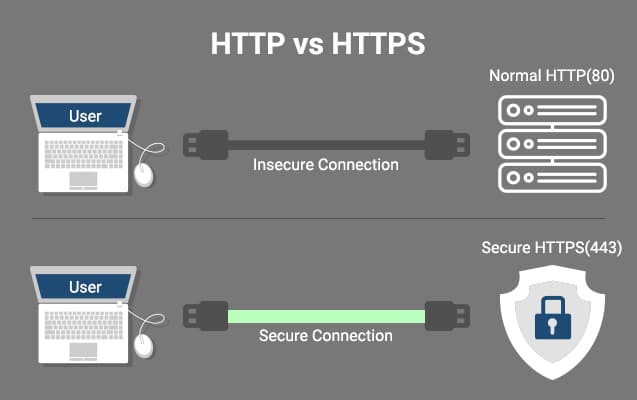
HTTPS is HTTP with a TLS layer inserted between the application (HTTP) and the transport (TCP):
HTTP:   Application (HTTP) → Transport (TCP) → Network (IP)

HTTPS:  Application (HTTP) → TLS → Transport (TCP) → Network (IP)
TLS provides three things:
Encryption. All data between client and server is encrypted. Credentials, tokens, request bodies, response bodies, even URLs and headers — all ciphertext to anyone observing the network. A packet sniffer on the same WiFi network sees only encrypted bytes.
Authentication. The server presents a TLS certificate signed by a trusted Certificate Authority (CA). The client verifies that the certificate is valid, unexpired, and issued for the hostname being accessed. This prevents man-in-the-middle attacks where an attacker intercepts traffic by impersonating the server.
Integrity. TLS uses message authentication codes (MACs) to detect tampering. If a packet is modified in transit — even a single bit — the modification is detected and the connection is terminated.
What HTTPS does not add
This is the part that catches teams out:
HTTPS does not secure your application. A valid TLS certificate on an endpoint that stores passwords in plaintext, has SQL injection vulnerabilities, or returns other users' data is still deeply insecure. TLS secures the channel. Everything above the channel is your responsibility.
HTTPS does not hide the destination. The domain name in the certificate is visible during the TLS handshake (via SNI — Server Name Indication) before encryption is established. An observer on the network knows you're talking to api.example.com — they just can't see what you're saying.
HTTPS does not prevent your server from being compromised. If an attacker gets into your infrastructure, TLS doesn't protect the data at rest or in processing — only in transit.
HTTP caching headers
HTTP has a built-in caching model that CDNs, browsers, and reverse proxies all implement. Getting these headers right is one of the highest-leverage performance optimisations available — and getting them wrong causes either stale content or unnecessary origin load:
| Header | What it does |
|---|---|
Cache-Control: max-age=3600 |
Cache this response for 3600 seconds |
Cache-Control: no-cache |
Revalidate with origin before serving from cache |
Cache-Control: no-store |
Never cache this response |
Cache-Control: private |
Only the browser can cache this (not CDN/proxy) |
ETag: "abc123" |
A fingerprint of the response — used for conditional requests |
Last-Modified: Thu, 01 Jan 2026 |
When the resource last changed |
Vary: Accept-Encoding |
Cache separately for different encodings |
In the URL shortener: redirect responses can be aggressively cached. Cache-Control: max-age=3600 on a 301 response means browsers and CDN edge nodes cache the redirect for an hour — reducing load on the origin server significantly. If a short URL's destination ever needs to change, use 302 (not cached by default) or ensure your cache invalidation strategy can clear the 301 cache entries.
The tradeoffs
HTTPS has a performance cost — but it's smaller than it used to be. The TLS handshake adds latency to new connections: typically one additional round trip for TLS 1.2, reduced to zero additional round trips for session resumption in TLS 1.3. On a 100ms round-trip connection, that's 100ms of additional setup time once per connection — amortised across all requests on a keep-alive connection, it becomes negligible.
HTTP/2 requires HTTPS in browsers. This is a practical constraint, not a protocol requirement, but it means upgrading from HTTP/1.1 to HTTP/2 for browser-facing traffic requires HTTPS. For most teams, this is a non-issue since HTTPS should be universal anyway.
Certificate management is operational overhead. Certificates expire (typically every 90 days with Let's Encrypt, up to 1 year with commercial CAs). An expired certificate is a hard failure for users — browsers refuse to connect and show a security warning. Automating certificate renewal is essential infrastructure work that's easy to defer and painful to neglect.
The one thing to remember
HTTP defines the conversation. HTTPS secures the channel that conversation travels through. They are not alternatives — HTTPS is the default for any service handling real users or real data, and has been for years. The performance cost of TLS is now minimal. The operational cost of certificate management is automatable. The risk of running HTTP for anything beyond a local development environment is not theoretical — it's a packet sniffer away from being a production incident.
← Previous: TCP vs UDP — the transport layer underneath HTTP
→ Next: TLS/SSL — we've established that HTTPS uses TLS for security. The next post goes inside the TLS handshake: how encryption is negotiated, what a certificate actually contains, and why TLS 1.3 matters for performance.




