Git HEAD
Introduction
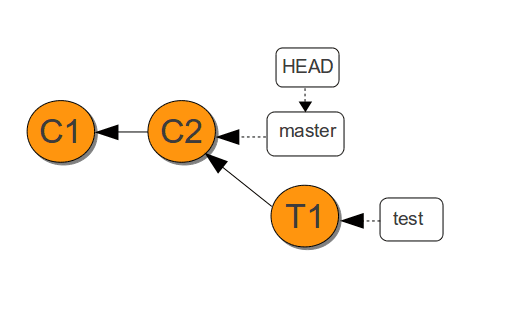
In Git, HEAD is a symbolic reference that points to the tip of the current branch, which in turn points to the most recent commit on that branch. It represents the snapshot of your project that is currently checked out in your working directory.
Key aspects of HEAD:
Current Commit Pointer:
HEADalways indicates the commit you are currently working on. When you create a new commit,HEADautomatically updates to point to this new commit.Default State (Attached
HEAD):In its default state,
HEADis "attached" to a branch. This means any changes you commit will be added to that specific branch, andHEADwill move along with the branch tip.Detached
HEAD:You can enter a "detached
HEAD" state by checking out a specific commit hash directly (e.g.,git checkout <commit-hash>). In this state,HEADpoints directly to a commit, not a branch. Changes made and committed in a detachedHEADstate will not be part of any existing branch unless you explicitly create a new branch from that commit.Referencing Previous Commits:
HEADcan be used with tilde (~) or caret (^) notation to refer to parent or ancestor commits:HEAD~n: Refers to the commitncommits beforeHEADin the commit history. For example,HEAD~1is the parent of the current commit.HEAD^n: Refers to then-th parent ofHEAD. This is primarily used with merge commits, which can have multiple parents.HEAD^is equivalent toHEAD^1.
Common uses of HEAD in Git commands:
git log HEAD: Shows the commit history starting from the currentHEAD.git reset HEAD~1: Undoes the last commit by movingHEADback one commit.git checkout HEAD~2 <file>: Checks out a specific file as it existed two commits ago.git show HEAD: Displays details of the commitHEADis currently pointing to.
Conclusion
In Git, HEAD is a crucial concept that you need to understand and it represents the current state of your local repository. It functions as a pointer to the most recent commit on the branch that is currently checked out.




