Caching: Storing Results Closer to Where They're Needed
Series: System Design · Caching — Pillar 5 of 8
Systems Design
| # | Post | What it covers |
|---|---|---|
| 00 | Caching: The Fastest Database Query Is the One You Don't Make | Caching is one of the most impactful and error-prone tools in system design. Six concepts covering the full lifecycle of a production cache layer. |
| 01 | Caching: Storing Results Closer to Where They're Needed ← you are here | Caching stores expensive results closer to the reader. Learn how it works, the main patterns, and when it hurts more than it helps. |
| 02 | Cache Invalidation: Knowing When the Copy Is Wrong | Cache invalidation is notoriously difficult. Learn the main strategies, when each applies, and how to avoid serving stale data at scale. |
| 03 | Distributed Cache: Spreading Cache Across a Cluster | A single cache node is a bottleneck and a SPOF. Learn how distributed caches partition data, replicate for availability, and handle node failures. |
| 04 | Cache Eviction Policies: What Gets Thrown Out When the Cache Is Full | When a cache fills up, something must go. Learn how LRU, LFU, FIFO, and TTL-based eviction work and how to choose the right policy for your data. |
| 05 | Cache Stampede: When Expiry Triggers a Database Avalanche | When a hot cache entry expires, hundreds of servers query the database simultaneously. Learn how cache stampedes happen and how to prevent them. |
| 06 | Cache Warming: Starting Hot Instead of Cold | A cold cache causes database overload on startup. Learn how to warm caches proactively using predictive loading, lazy warming, and scheduled jobs. |
| 07 | Caching: Wrap-Up | A recap of all 6 caching concepts: what caching is, invalidation strategies, distributed caches, eviction policies, stampedes, and warming. How they connect. |
Caching: Storing Results Closer to Where They're Needed
The problem
Your URL shortener resolves short codes to destination URLs. At modest traffic the flow is simple: receive a request for sho.rt/x7Kp2, query PostgreSQL for the destination URL, return a redirect. PostgreSQL handles it comfortably.
Then a link goes viral. A single short code receives forty thousand requests per second from a news article. PostgreSQL bogs down. Queries that took two milliseconds now take two hundred. The connection pool exhausts. Other queries — analytics writes, user lookups, link creation — start timing out. One popular link is degrading the entire platform.
The troubling part: every one of those forty thousand requests is asking for the same answer. The destination URL for x7Kp2 is https://example.com/some-long-path. It hasn't changed. You're doing the same database round-trip forty thousand times per second to retrieve the same immutable value.
You're paying full price for every read. Caching is the insight that you don't have to.
The core idea
A cache is a storage layer that sits between a caller and a slower data source, holding copies of recently or frequently accessed data so they can be served faster and at lower cost. Instead of computing or fetching a result every time, you compute it once, store it, and serve the stored copy on subsequent requests.
The value proposition is straightforward: reads are almost always more frequent than writes, and many reads ask for the same data. If you can serve a read from memory instead of disk, from memory instead of a network hop, or from a local process instead of a remote database, you reduce latency and reduce load on the origin system.
The analogy: a notepad on your desk
Imagine you work in an office and frequently need to look up a colleague's phone extension. The official directory is a thick binder in the filing room two floors down. The first time you need an extension, you go downstairs, find the number, and write it on the notepad on your desk. Every subsequent time you need that extension, you check the notepad first. The filing room exists and is authoritative — but you rarely need to go there.
The notepad is your cache. It's faster (right in front of you), smaller (only numbers you've looked up), and possibly stale (if the colleague changes extension and the binder is updated but you haven't crossed out the old number).
The tradeoff that will define this entire pillar lives in that last sentence. The notepad is fast because it's local. It can be wrong because it doesn't automatically know when the authoritative source changes.
How caching works
The basic read flow
Without cache:
  Client → App Server → Database → App Server → Client
  Latency: ~20ms per request, full DB load every time

With cache:
  Cache hit:
    Client → App Server → Cache → App Server → Client
    Latency: ~1ms, no DB involvement

  Cache miss:
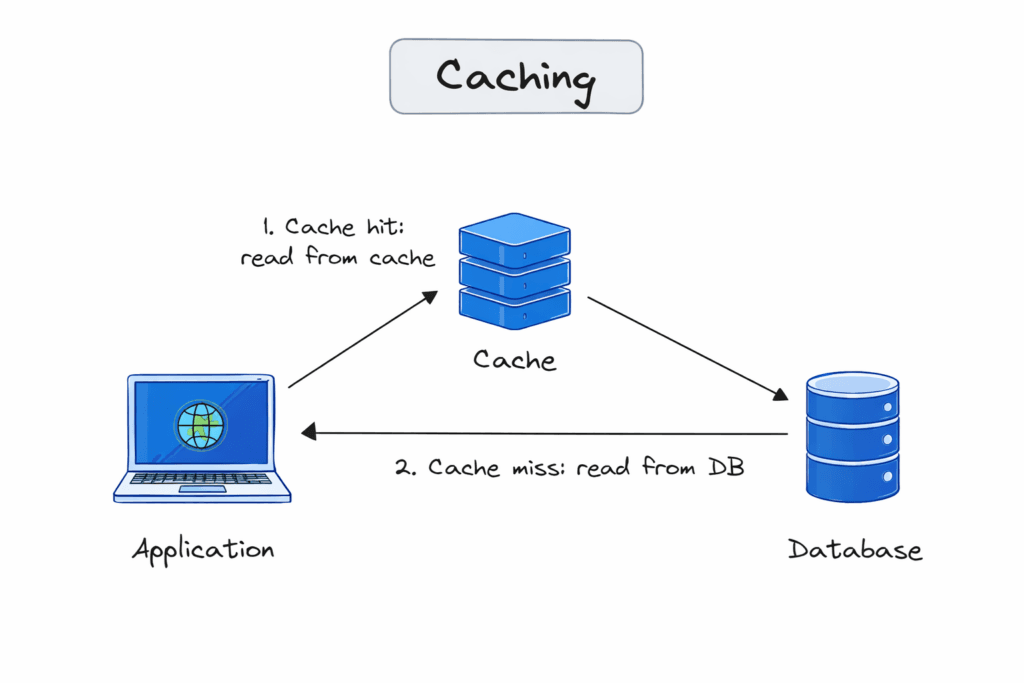
    Client → App Server → Cache (miss) → Database → App Server
    App Server writes to Cache
    App Server → Client
    Latency: ~22ms (cache miss overhead + DB), result now cached
The first request for sho.rt/x7Kp2 is a cache miss — the cache has no entry for this key. The app fetches from the database, stores the result in cache with a TTL (time-to-live), and returns the response. Every subsequent request for the same key is a cache hit — the cache returns the stored value directly, without touching the database.
Cache hit ratio
The cache hit ratio is the fraction of requests served from cache rather than the origin. A 90% hit ratio means 90% of reads never reach the database. A 99% hit ratio means 1 in 100 reads does. For a high-traffic read-heavy system, improving hit ratio from 95% to 99% can reduce database load by 80%.
Hit ratio = Cache hits / (Cache hits + Cache misses)
At 40,000 req/s with a 99% hit ratio: 400 req/s reach the database. At 40,000 req/s with a 95% hit ratio: 2,000 req/s reach the database. At 40,000 req/s with no cache: 40,000 req/s reach the database.
Caching patterns
Cache-aside (lazy loading) — the most common pattern. The application checks the cache first. On a miss, the application fetches from the database, populates the cache, and returns the result. The cache is populated on demand.
def get_destination(short_code):
    # 1. Check cache
    cached = redis.get(f"url:{short_code}")
    if cached:
        return cached  # cache hit

    # 2. Cache miss — fetch from DB
    url = db.query("SELECT destination FROM links WHERE code = ?", short_code)

    # 3. Populate cache with TTL
    redis.setex(f"url:{short_code}", ttl=3600, value=url)

    return url
Read-through — the cache sits in front of the database and handles the miss itself. The application only talks to the cache; the cache fetches from the database when needed. The application code is simpler, but you need a cache that supports this pattern.
Write-through — on every write, the application writes to the cache and the database simultaneously. The cache is always consistent with the database. Cost: every write hits both systems, even if the written data is never read from cache.
Write-behind (write-back) — writes go to the cache first; the cache asynchronously flushes to the database. Very low write latency. Risk: if the cache fails before flushing, data is lost.
Write-around — writes go directly to the database, bypassing the cache. The cache is only populated on reads. Good for write-once data that is rarely re-read.
Where caches live
Caches exist at every layer of a system:
Browser cache — HTTP response headers (
Cache-Control,ETag) instruct the browser to store responses locally. Zero server cost for repeat visitors.CDN cache — edge nodes cache static assets and sometimes dynamic responses close to users. Covered in Pillar 2.
Application-level cache — in-process memory (a dictionary in your app server). Extremely fast, but local to one instance and lost on restart.
Distributed cache — a shared external cache (Redis, Memcached) accessible to all app server instances. Consistent across the cluster. Covered in post 03.
Database query cache — some databases cache query results internally. Generally unreliable at scale; explicit application-level caching is more predictable.
TTL and expiry
Every cache entry should have a TTL — a duration after which it expires and is evicted. Without TTL, a cache entry can sit indefinitely, serving stale data long after the source has changed.
TTL is a blunt instrument for cache invalidation. If the destination URL for x7Kp2 changes, a cache entry with TTL=3600 will serve the old URL for up to an hour. For data that changes infrequently and where brief staleness is acceptable, TTL alone is sufficient. For data that must be immediately consistent, TTL alone is not enough — you need active invalidation. That's post 02.
Tradeoffs
Speed vs consistency. A cache is a copy. The copy can be out of date. Every caching decision is implicitly a decision about how stale data can get before it causes a problem.
Hit ratio vs memory. A larger cache holds more entries and tends to have a higher hit ratio. Memory costs money. The relationship is non-linear — a cache holding the most popular 20% of your data often achieves 80% of the achievable hit ratio (Pareto applies). Doubling cache size rarely doubles hit ratio.
Simplicity vs correctness. Cache-aside is easy to implement. Write-through adds complexity. Write-behind adds failure modes. Each pattern involves a correctness/complexity tradeoff.
Warming time. A cold cache (empty on startup) performs poorly until it fills. During a deployment or cache failure, the database absorbs traffic it normally wouldn't see — potentially overwhelming it. Cache warming (post 06) addresses this.
When to use it / when not to
Use caching when:
Data is read far more often than it is written
The same data is requested by many different clients
The data source (database, external API, computation) is expensive to query
Brief staleness is acceptable for the use case
Think carefully when:
Data changes frequently and stale reads cause correctness problems
Write patterns are complex (cache invalidation becomes difficult)
Your system has low traffic and the database isn't a bottleneck — cache adds complexity without benefit
Data is highly personalised (low cache hit ratio — every user's data is unique)
In the URL shortener: destination URLs are the ideal cache target. They're read millions of times, written rarely, and brief staleness (a few seconds to a minute) is acceptable for most links. User account data, link metadata, and analytics aggregates are also good candidates. Raw click events (high write volume, rarely re-read) are not.
The one thing to remember
A cache is a faster copy of slower data — it trades consistency for speed. The fundamental questions for any cache decision are: how often does this data change, how stale can it get before it causes a problem, and how will the cache know when to update? Get the hit ratio up, keep TTLs appropriate, and always have a plan for what happens when the cache is cold or wrong.
← Previous: Pillar 5 Overview — introducing the caching pillar
→ Next: Cache Invalidation — storing data in a cache is the easy part; knowing when to remove or update it is where most cache bugs live.




