Asking GitLab the Latest Version of an Artifact
Introduction
To determine the latest version of an artifact in GitLab, particularly in the context of CI/CD pipelines and releases, one can utilize the GitLab API or the UI.
But what if you have a project that has multiple dependencies and you wish to see the latest vesions of each dependency?
How to Approach it?
One option as discussed in the introduction, is to use the GitLab API and query it multiple times, once per dependency you are trying to find the latest version of.
A slightly better option is to script it, and this is what this script does for you:
#!/bin/bash

# GitLab API Base URL
GITLAB_API_URL="https://gitlab.com/api/v4"

# GitLab Group ID (Replace with your actual group ID)
GROUP_ID="[REPLACE_WITH_YOUR_GROUP_ID]"

# Package Name (Pass this as an argument when running the script)
PACKAGE_NAME="$1"

# Personal Access Token (Replace or export as an env variable)
GITLAB_TOKEN="[REPLACE_WITH_YOUR_PAT]"

# Input file containing package names (passed as argument)
LIBRARIES_FILE="$1"

if [[ -z "$LIBRARIES_FILE" || ! -f "$LIBRARIES_FILE" ]]; then
  echo "Usage: $0 <libraries-file>"
  exit 1
fi

# Function to compare versions normally
compare_versions() {
  local v1="$1"
  local v2="$2"

  # Compare versions using sort logic
  if [[ "$v1" == "$v2" ]]; then
    return 2
  elif [[ "$v1" < "$v2" ]]; then
    return 1
  else
    return 0
  fi
}

while IFS= read -r PACKAGE_NAME; do
  # Trim whitespace
  PACKAGE_NAME=$(echo "$PACKAGE_NAME" | xargs)

  # Skip empty lines
  if [[ -z "$PACKAGE_NAME" ]]; then
    continue
  fi

  echo "🔍 Checking latest version for: $PACKAGE_NAME"

  # Fetch package versions from GitLab API
  response=$(curl -s --header "PRIVATE-TOKEN: $GITLAB_TOKEN" \
    "$GITLAB_API_URL/groups/$GROUP_ID/packages?package_name=$PACKAGE_NAME&per_page=200")

  # Ensure response is valid JSON
  if ! echo "$response" | jq empty 2>/dev/null; then
    echo "❌ Error: Invalid JSON response from GitLab API"
    continue
  fi

  # Extract versions and filter only valid semantic versions
  versions=$(echo "$response" | jq -r '.[].version' | grep -E '^[0-9]+\.[0-9]+\.[0-9]?$')

  if [[ -z "$versions" ]]; then
    echo "⚠️ No valid semantic versions found for '$PACKAGE_NAME'."
    continue
  fi

  # Report found versions
  if [[ ${#versions[@]} -gt 0 ]]; then
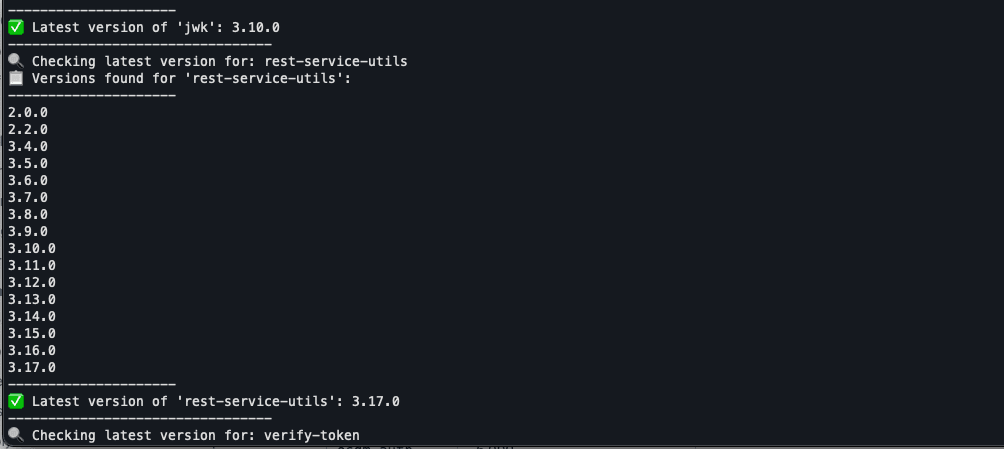
    echo "📋 Versions found for '$PACKAGE_NAME': "
    echo "---------------------"
    for version in "${versions[@]}"; do
      echo "$version"
    done
    echo "---------------------"
  else
    echo "⚠️ No versions found for '$PACKAGE_NAME'."
  fi

  # Separate release and SNAPSHOT versions
  release_versions=$(echo "$versions" | grep -v "SNAPSHOT" | sort -V)

  # Get the highest stable versions
  latest_release=$(echo "$release_versions" | tail -n 1)

  echo "✅ Latest version of '$PACKAGE_NAME': $latest_release"
  echo "---------------------------------"

done < "$LIBRARIES_FILE"
Using the script:
Simple invoke it passing in a file containing the artifact names you wish to know the latest version available:
latest-lib.sh ~/Documents/libs.txt
And the content of libs.txt can be something like:
rest-service-utils
verify-token
Note: Make the necessary adjustments to both the script and the input text file to match your project.
Conclusion
As you can see this little utility script can easily answer the quesstion about the latest version of an artifact for multiple artifacts at once.




